


One of the most significant setbacks for a WooCommerce store is fake orders and fraud. WP Beginners reported online stores lost over $20 billion in revenue due to common fraudulent activities in 2023. Unfortunately, for some online stores, the loss due to fraudulent orders was 4% higher than the total revenue.
Moreover, every $100 in fraudulent orders costs businesses $207 in loss.
Considering the facts, WooCommerce fraud prevention is absolutely necessary for a business in the long run. 25% of customers would request a refund even if they liked and plan on keeping the product.
That’s because sellers who ship from a distance usually pay high costs to ship the product to the buyer. The return cost is generally higher, so the seller may decide against returning that product while also refunding your purchase. That way, customers keep the product without spending a penny.
It is one of the WooCommerce fraud techniques, and we will learn more about it in this article. Keep reading as we dive deep into actionable WooCommerce fraud prevention techniques.
Understanding 4 WooCommerce Frauds
Before we proceed further, let’s take a moment to understand the four common WooCommerce frauds and how customers tend to commit them.
1. Payment Fraud
This is one of the most common types of online fraud. Payment fraud occurs when cyber attackers or hackers obtain credit card information from ordinary users through social engineering, phishing, brute force, or other common types of cyberattacks and use that information to make purchases.
2. Chargeback
Chargeback Fraud, also known as Friendly Fraud, occurs when a customer makes a legitimate purchase using a credit card but later files an issue to their bank or card issuer, claiming the transaction was unauthorized or they never received the product. The bank typically reverses the charge, and the customer gets their money back, allowing them to keep the product without any charge.
3. Refund Fraud
Many companies are super generous in their return policies, offering no-questions-asked returns. Some entitled customers love to exploit such policies by requesting refunds and lying or manipulating the seller.
They may return a different or used item, file a non-delivery claim even after receiving the product, or, for some long return policies, buy and use the product only to request a refund afterward. The cycle continues, and they keep buying and returning the product without paying as they receive their cash back on refund requests.
4. Account Takeover
Account Takeover (ATO) fraud occurs when a cybercriminal gains unauthorized access to a legitimate user’s online account and uses it for malicious activities. Afterward, hackers may make purchases without the account owner’s consent.
6 Common Techniques For WooCommerce Fraud Prevention
All these practices significantly harm businesses in terms of revenue, inventory, and customer trust. Therefore, you should implement these six techniques to prevent WooCommerce fraud.
#1: Implement Strong User Authentication
A staggering number of these fraudulent orders are from bots. In fact, bad bots generate 30% of total internet traffic.
These bots roam the internet, causing fake orders to annoy or harass WooCommerce businesses. Strict user authentication strategies can easily prevent such orders. Therefore, implementing strict measures is necessary. Here’s a strong plan:
- Encourage Users to Use Strong Passwords
One of the main reasons for cyberattacks like account takeovers is weak passwords. There have been several instances where companies suffered critical cyberattacks due to weak passwords.
The infamous SolarWinds instance is one of the examples.
Thus, encourage users to use super-strong passwords that use a combination of uppercase and lowercase letters, numbers, and symbols. Also, encourage them not to use common and easy-guessable passwords like their name followed by 123 or birth year. Check out this blog post for seven common mistakes you should avoid while creating a password.
- Verify Their Emails While Placing an Order
Numerous spam orders are placed using fake emails. Verifying the email before placing an order can reveal its legitimacy. This increased friction alone can make significant drops in your total fraudulent orders.
- Disable Guest Checkout
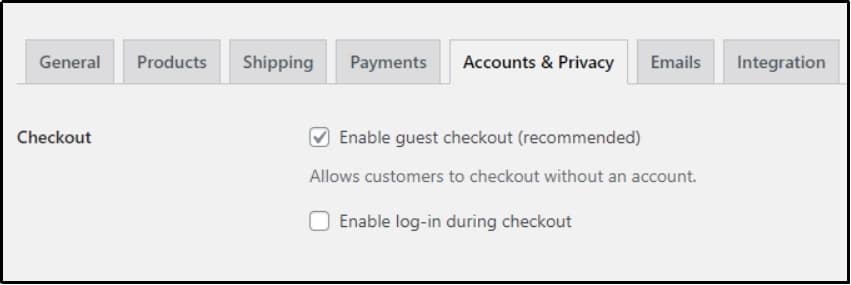
Disabling guest checkout forces users to create a personal account before checkout. With this enabled, the user will be prompted to create an account before their order is confirmed. This reduces spam and bot checkouts.
You can do that by navigating to WooCommerce Settings >> Accounts & Privacy tab and unchecking the ‘Enable guest checkout’ box. As you can see, WooCommerce recommends this too!
#2: Install Fraud Detection Tools and Plugins
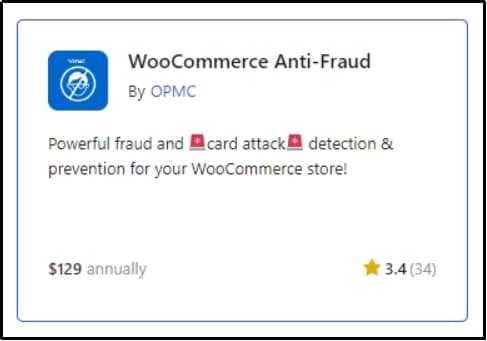
Another super effective WooCommerce fraud prevention technique includes utilizing common fraud detection tools and plugins such as the WooCommerce Anti-fraud plugin. This extension offers multiple fraud prevention features.
You can also try other alternatives, such as:
- Fraud Prevention Plugin for WooCommerce by FraudLabs Pro
- WooCommerce Anti-Fraud by WPShopmart
- Wordfence Security (with WooCommerce integration)
- StopBadBots for WooCommerce
These alternative extensions offer basic functionalities for free that should be enough for a small store.
Such plugins or extensions offer multiple benefits that can be super beneficial for WooCommerce fraud prevention. For example, WooCommerce anti-fraud allows you to set a least and highest-risk threshold score. Whether you want to use the free or premium version is up to you.
#3: Monitor and Manage Orders for Suspicious Activity
Regular monitoring before sending your product can also help reduce the risk of WooCommerce fraud. Scammers and bots tend to make mistakes that seem unreal. For example, buying in excessive quantities, using unusual shipping addresses, or making multiple failed attempts.
This is not only for orders, but you should also be aware of every order and activity. If you see an unusual number of new accounts, that could be a sign of a bot or account takeover. If there is a rapid rise in failed login attempts, that is a very good sign of a brute-force attack.
Moreover, regular monitoring can also help identify refund and chargeback patterns. As we discussed, a number of customers request refunds and keep this cycle on repeat, resulting in them using the product without spending the cost of using it.
Identifying such behavior can help prevent such customers from exploiting your return policies. You can effortlessly ban such IP addresses to prevent them from purchasing from your WooCommerce store ever again.
Lastly, fraudsters can use fake orders to deplete stock, creating shortages for legitimate buyers. By monitoring orders and patterns, you can detect and block fraudulent attempts. That allows room for legitimate buyers looking for your product.
You can use tools like Wordfence or Sucuri to monitor security-related issues.
#4: Avoid Cash-on-Delivery (COD) When Possible
Many countries, like Thailand, Indonesia, Mexico, etc., prefer cash-on-delivery over online payment. However, those stores that offer this payment option are prone to more fraudulent orders than those that do not.
This payment option allows fraudsters to order with a fake address or simply refuse to accept the offer once it has reached their door.
Worse of all, they can cancel the order after it has already been shipped. That means you will have to pay for shipping and return costs if you plan on returning it. A couple of such orders cumulatively can be a massive financial burden for your business, especially for those who are just starting or those with tight budgets.
Thus, you should use this option after thorough contemplation. If you believe your business can sustain such setbacks, go for it. Alternatively, you can make up for that by allowing other payment options.
⚠️Warning: If you operate in a country that prefers COD, constraining customers of their favorite payment option may not be the best option for your business. Hence, we recommend thorough research before taking an official step.
If you are in an area or country where this is a definite option, try implementing an Address Verification System (AVS). AVS checks that the billing address provided by the customer matches the address on file with the card issuer. This helps customers who are ordering from fake addresses or hackers who are using stolen cards.
#5: Secure Payment Gateways
Securing your payment gateway not only helps with WooCommerce fraud prevention but also builds customer trust. Customers love secure payment options. They pay when they feel safe. And making them feel safe is pretty easy. Here’s what to do:
- Install SSL Certificate
SSL or Secure Socket Layer encrypts the data transferred between the customer’s browser and your website, ensuring the protection of sensitive information like credit card numbers and personal details
Usually, SSL is included in most web or WordPress hosting packages. Alternatively, go to Let’s Encrypt to get one for yourself for free.
???? To enhance your WordPress security further, try Password Protected! The plugin allows multiple features that can help with your website hardening.
- Integrate with Trusted Payment Gateways
Use reputable payment gateways like PayPal or Stripe. These giants use multiple security features such as fraud detection, secure tokenization, and PCI-DSS compliance (Payment Card Industry Data Security Standard).
These services also use machine learning to monitor each transaction. PayPal claims their machine learning technologies get smarter with every transaction, helping users with WooCommerce fraud prevention 24/7.
- Implement 3D Secure (3DS)
3D Secure works similar to two-step verification but for credit and debit cards. It adds an extra layer of protection while purchasing with a card. It requires the customer to verify their identity through a password, one-time code, or biometric check from their bank.
This helps keep fraudsters away who try payment fraud.
6. Chargeback Management and Prevention
We have already discussed what chargebacks are in the first section, along with other common WooCommerce frauds.
To recap, it occurs when customers use a debit or credit card to purchase a product and then contact their banks or card issuers to make fraudulent claims, such as they never received the product or the payment wasn’t authorized, in an attempt to obtain the cash back while they also keep the product.
Here is what you can do to fight such frauds:
- Regular Monitoring to Analyze Cash Back Patterns
Regular monitoring can help you recognize common cashback patterns or trends. Afterward, you can further adjust your chargeback policy accordingly to prevent such WooCommerce fraud. Regular monitoring also helps you with early detection of such a case, allowing you to reject the offer or block the user from your WooCommerce store.
- Refurbish Your Return Policy
Be crystal clear in your policies, and do not allow fraudsters to exploit your policies to gain any inappropriate advantage. Clearly state return, refund, and dispute policies. Ensure customers are well-informed about these policies to reduce misunderstandings that might lead to chargebacks.
- Implement AVS and CVV2 Verification
This is another term that we have already discussed before. AVS, or an address verification system, can work even better when combined with CVV2 or Card Verification Value, which is an anti-fraud technique that credit card companies use all around the world.
It is used to determine if the card issuer recognizes the CVV value given to you by the user. This additional verification step can verify if the user actually has the card they are using.
Final Remarks
WooCommerce fraud prevention is not a one-time process. It is a demanding ongoing process that requires regular monitoring and changes according to the ongoing threats and trends.
You should fully understand common WooCommerce frauds; it is always wise to be a step ahead of fraudsters and hackers. Be aware of the tricks and steps they play, and make sure to educate your audience and other administrators as well.
To password protect your WooCommerce store, download Password Protected today!
Lastly, if you need help, our support team is just a text away. We love to solve our customer’s queries.
Frequently Asked Questions
How can I reduce the risk of fake orders in WooCommerce?
To reduce the risk of fake orders on WooCommerce, implement strong user authentication and install fraud detection tools, plugins, and extensions. Avoid cash-on-delivery when possible and secure your payment gateways. Lastly, regularly monitor your activity logs so you can quickly and early detect any incoming threat.
What steps can I take to protect my WooCommerce store from fraud?
You can install anti-fraud tools and extensions to protect your WooCommerce store from fraud. Premium tools like WooCommerce anti-fraud extension or free alternatives like Wordfence Security (with WooCommerce integration) and StopBadBots offer multiple security features that can help protect your WooCommerce store from fraud.
What are some best practices for handling chargeback fraud?
To handle chargeback fraud, regularly monitor your activity logs to identify suspicious patterns. Also, implement strict security and verification systems to reduce the chances of such fraud. Finally, reevaluate your return policy, refund, and dispute policies to see if there is a loophole that bad customers can exploit.
How do I protect my WooCommerce store from bots and automated attacks?
To protect your WooCommerce store from bots and automated attacks, implement strong user authentication. Require your users to pass through multiple human verification tests such as hCAPTCHA, reCAPTCHA, or 2FA. Also, password-protect your website using a plugin like Password Protected to add another layer of security. If all of that is not enough to stop bots, implement a firewall to filter incoming traffic.