

Want to protect your WordPress content from theft, scrapers, and unauthorized access?
As time passes, content theft is becoming more pervasive and damaging for WordPress site owners. Scrapers and bad actors routinely steal articles, images, and media, republishing them without permission.
This can dilute your search rankings, confuse search engines about content ownership, and damage your brand credibility.
Whether you run a personal blog, a membership site, or a business website, you need clear controls over who can access and reuse your content.
In this guide, you’ll learn nine practical and proven ways to protect content in WordPress, ranging from password protection and firewalls to legal safeguards and anti-scraping techniques.
Without further ado, let’s dive right in.
9 Ways to Protect Content in WordPress
Content protection isn’t one-size-fits-all. Depending on what you publish, you may need simple access controls or advanced security layers.. Below, we have listed the most effective methods to secure your site today.
1. Password Protect Your Content
One of the most reliable ways to protect content in WordPress is to restrict access using passwords. This allows you to hide your work behind a secret code that only chosen people know. It is a simple but very strong way to stop people from stealing your ideas or viewing private data.
While WordPress includes basic password protection, it lacks advanced controls such as multiple passwords, access tracking, and granular content restriction. For example, it does not let you manage many passwords at once or track who is using them.
Read More: What are the Visibility Options in WordPress? [Ultimate Guide]
The better way to handle this is by using a dedicated plugin. A more flexible and scalable solution is the Password Protected plugin. This plugin gives you complete control over who sees what. You can lock your whole site, specific pages, or even just small parts of a post.
Here are some of the powerful features you get with the Password Protected plugin:
- Unlimited Passwords: You can create as many passwords as you need for a single page or category.
- Partial Content Protection: You can lock specific sections of a page using shortcodes (small bits of code) while keeping the rest of the page public.
- Bypass Links: You can create special links that let users view protected content without ever typing a password.
- Expiration Dates: You can set passwords to stop working after a certain date or after they have been used a specific number of times.
- Limit Login Attempts: This protects your site from Brute Force Attacks (when hackers try to guess your password by trying thousands of combinations).
- Category Protection: You can lock an entire category of posts with just one click.
- Activity Tracking: You can see which IP (Internet Protocol) addresses are accessing your content and when.
- And more! Check out the complete features list.
2. Use Copyrights and Trademarks to Establish Content Ownership
Another smart way to protect content in WordPress is by using legal tools like copyrights and trademarks.
A copyright (a legal right that gives the creator of an original work sole rights to use it) tells the world that you own your writing, photos, and videos. A trademark (a recognizable sign or design that identifies products or services) protects your brand name and logo.
When you display a copyright notice on your site, it acts as a warning to content thieves. It shows that you are serious about your work and will take action if someone steals it. According to the U.S. Copyright Office, your job is actually protected the moment you create it, but displaying a notice makes it much clearer to others.
Here’s an example of a copyright notice displayed on a WordPress website.

Copyright notice on PostSMTP’s website.
Using these legal protections helps in several ways:
- Legal Proof: It provides proof that you are the original owner if you ever need to go to court.
- Discourages Theft: Most people are less likely to steal if they see a formal legal notice.
- DMCA Power: It makes it easier to send a DMCA (Digital Millennium Copyright Act) notice. This is a formal request to a hosting company to take down stolen content.
- Brand Safety: Trademarks ensure that competitors cannot confuse your customers by using similar names or symbols.
3. Build a Gated Community or Membership Site
While password protection is perfect for locking specific doors, a membership site is like building a private clubhouse. This approach is fundamentally different from simple password protection.
In a membership site, you create a “gated community.” Instead of typing a password every time they want to see a new page, verified users log in once with their own account. Once they are inside, they can move around freely and see everything their membership level allows. This creates a much smoother experience for your fans and builds a real sense of belonging.
To achieve this, you can use a dedicated tool like MemberPress. It turns your website into a powerful system where you can manage hundreds or thousands of members at once.
Also Read: Password Protection vs Membership Plugins: Which Is Better for WordPress Post Visibility?
This option offers frictionless browsing. Once logged in, members don’t have to deal with annoying pop-ups or password fields as they navigate your site. Moreover, you can release content slowly over time to keep members coming back.
Plugins like MemberPress often integrate with forums, allowing your members to talk to each other in a safe, private space.
Furthermore, this method also opens a gate to monetization. If you want to charge for your content, membership plugins handle the payments and renewals automatically.
4. Turn Off Right-Click and Text Selection
If you want to stop casual “copy-pasting,” you can disable right-clicking on your website.
Usually, when a person right-clicks, they see a menu that lets them “Save Image As” or “Copy.” By turning this off, you make it much harder for someone to quickly grab your work.
You can also disable text selection. This prevents people from highlighting your sentences and copying them to another document. While this method won’t stop advanced users, it effectively blocks casual copy-pasting by most visitors.
The easiest way to do this is with a plugin like WP Content Copy Protection & No Right Click.
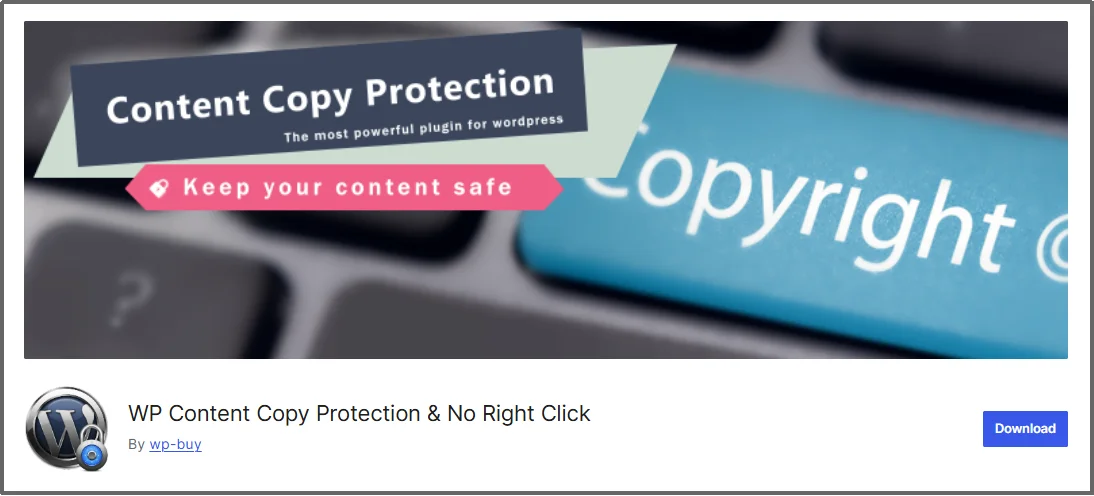
It stops users from easily downloading your custom images or artwork and prevents people from grabbing whole paragraphs to use on their own blogs. Moreover, you can set up a pop-up message that appears when someone tries to right-click, explaining that your content is protected.
5. Add Watermarks to Your Images
If your website uses original photos, illustrations, or designs, adding a watermark is a must.
A watermark is a faint logo or text placed over an image that marks the file as your own. Even if someone manages to download the image or take a screenshot, your brand name or logo stays attached to it.
This is a very common practice for photographers and artists because it makes it almost impossible for someone else to claim they created the work. If a thief tries to use your image on their own site, they actually end up promoting your brand for free.
You can automate this process easily by using a plugin like Envira Gallery or Easy Watermark.
These tools automatically add your logo to every image you upload to WordPress, which provides clear proof of ownership. This acts as a permanent identity card for your visual content and works as a strong deterrent. Most content thieves want clean images, so they will likely move on to a different site if they see your watermark.
Furthermore, having your logo on your images helps build brand awareness when your work is shared on social media. It also provides excellent legal evidence if you ever need to prove an image is yours in a copyright dispute. By using this method, you ensure that your visual assets remain protected no matter where they travel on the web.
6. Delay or Limit Your RSS Feeds
RSS (Really Simple Syndication) is a tool that allows users and apps to get updates from your site automatically. While this is great for fans, it is also a favorite tool for scrapers. Scrapers are automated programs that use your RSS feed to steal your content and post it on their own sites the second you hit publish.
To combat this, you can choose to delay your RSS feed by a few hours. This gives search engines time to crawl and index your content first, helping them correctly identify your site as the original source. When Google sees your content first, it recognizes you as the original source, which protects your rankings.
Another smart move is to only show a “summary” in your feed rather than the full article.
By taking these steps, you make it much harder for bots to profit from your hard work. It ensures that your website remains the primary destination for your readers while keeping automated thieves at bay.
7. Prevent Image Hotlinking
Hotlinking is a sneaky way people steal not just your images, but also your server’s power.
It happens when someone embeds an image from your site onto their own website using your direct image link. This means every time someone visits their site, your server has to work to show the image, which costs you money and slows down your website.
To stop this, you can enable hotlinking protection to block other sites from displaying your files.
When you turn this on, the image will simply fail to load on the thief’s site, or it might show a warning message instead. This ensures that the amount of data your site can send to visitors (the bandwidth) is only used for your own audience.
Many WordPress security plugins or hosting providers offer a one-click setting to disable hotlinking. It is a vital move for any site owner who wants to keep their resources under their own control.
8. Use a Firewall to Block Automated Scraping
Content scraping is often done by bots rather than humans. These bots visit your site hundreds of times a day to steal your latest updates.
A powerful way to stop automated scraping is by using a Web Application Firewall (WAF). It stands for Web Application Firewall. A WAF acts like a digital security guard that stands between your website and the rest of the internet to check every visitor before they are allowed in.
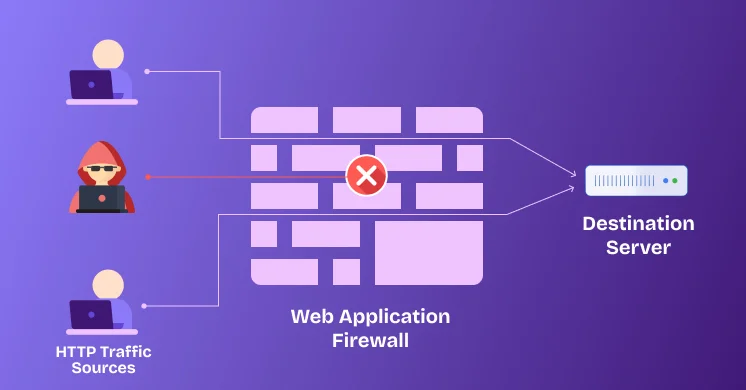
Most modern firewalls use real-time data to identify known “bad actors” or suspicious patterns. For instance, if a bot tries to download every single page on your site in a matter of seconds, the firewall will recognize this as “scraping” and block the IP address immediately. This keeps your content safe and also saves your server from being slowed down by excessive bot traffic.
You can easily set this up using top-rated plugins like Wordfence or Sucuri. These tools come with a built-in firewall that updates its list of threats every day to protect against the latest scraping methods.
By using a WAF, you ensure that only real human readers and “good” bots, like Google, can see your work, while keeping the automated thieves far away from your data.
9. Prevent “Frame Snatching” with iFrame Protection
Frame snatching, or clickjacking, is a trick where a thief displays your entire website inside a small window on their own site. They use a tool called an iFrame, which stands for Inline Frame.
The iFrame allows them to make it look like your content belongs to them, even though your server is doing all the work to show it.
To stop this, you can add a simple security rule to your site that tells web browsers not to allow your pages to be shown inside a frame. When you enable this protection, any attempt to “embed” your site will result in a blank window or an error message.
Most security plugins offer this feature. By blocking iFrames, you protect your site from being used in scams or being stolen by competitors who want to piggyback on your hard work. It is an essential layer of defense for any WordPress site owner who wants full control over their digital presence.
What to Do If Your Content Has Already Been Stolen?
It is a sad truth that even with the best security, content theft is very common on the internet today. Discovering stolen content can be frustrating, but there are clear and effective steps you can take to resolve the issue.
Step 1: Identify the Theft and Gather Evidence
The first step is to confirm the theft and gather proof.
You can find stolen text by copying a unique sentence from your post and searching for it on Google inside quotation marks. Alternatively, use a premium plagiarism checker like Copyscape or Turnitin for optimal accuracy.
For images, you can use a tool like Google Reverse Image Search to see where else your photos are appearing. Once you find a copycat, make sure to take screenshots of the offending page as evidence.
Step 2: Contact the Owner and the Web Host
After you have your proof, the next move is to contact the website owner directly.
Many times, people use stolen content because they hired a bad writer or simply didn’t know the rules. A polite but firm email asking them to remove the content within 24 to 48 hours is often enough to solve the problem.
Most honest site owners will comply immediately to avoid further trouble.
If the owner ignores you, it is time to escalate the issue to their web host. You can use a tool like WhoIsHostingThis to find out which company provides the server for the thief’s website.
Most hosting companies have a strict policy against copyright infringement. Sending them a formal DMCA (Digital Millennium Copyright Act) takedown notice will often result in the host removing the content for you.
Step 3: Report the Violation to Search Engines
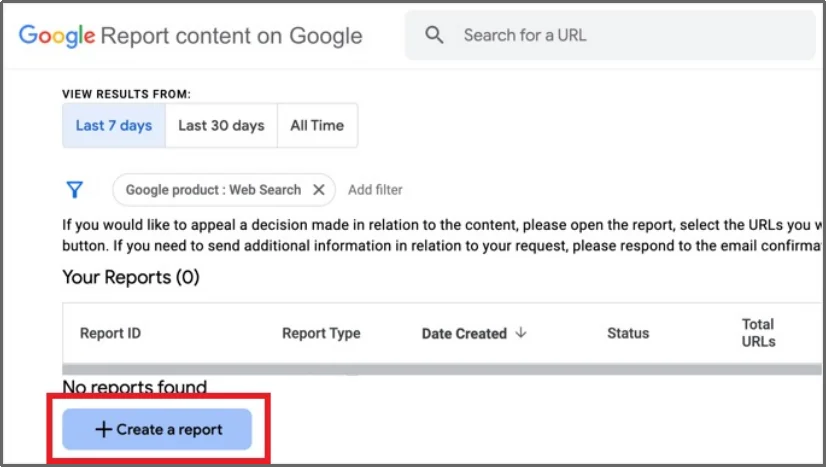
Finally, if all else fails, you can report the theft directly to Google. By using the Google Search Console Copyright Removal tool, you can request that the stolen page be removed from search results. This ensures that the thief cannot profit from your work and protects your site’s reputation in the long run.
Take Control of Your Content Security Today
Protecting your WordPress site is no longer optional in 2026. As we have discussed, content theft and scrapers can damage your reputation and hurt your search engine rankings.
From using watermarks and disabling right-clicks to blocking malicious bots with a firewall, you now have a complete roadmap to keep your hard work safe. Each of these layers works together to ensure that your ideas and assets stay on your website.
While there are many ways to defend your site, the most effective first step is controlling who can see your pages. Simple built-in tools are often not enough to stop determined thieves. By using a professional solution, you can lock down your data with confidence and focus on growing your business instead of worrying about copycats.
If controlling who can access your content is a priority, a dedicated solution like the Password Protected plugin offers the flexibility and control most WordPress sites need. It gives you the power to hide your entire site or specific sections with just a few clicks. Take the first step toward a safer website and start protecting your content like a pro.