


Do you want to protect your WordPress website visitors from a session hijacking attack? If so, you have landed on the right page.
Session hijacking is one of the most common WordPress attacks. So, as a WordPress website admin, you need to protect your website visitors from this threat.
Session hijacking occurs when an attacker steals a user’s session ID and accesses their account without their permission. While this type of attack usually targets site visitors, hackers can also use your WordPress admin account as a gateway for such attacks.
That’s why you should implement a prevention mechanism and check for vulnerabilities regularly that could lead to session hijacking.
In this guide, we’ll explain what a WordPress session hijacking attack is, how it works, and how you can protect your site against it.
Ready? Let’s jump right in!
What is WordPress Session Hijacking? —Brief Introduction
Session hijacking, commonly called an impersonation attack or WordPress Cookie Stealing, occurs when an attacker takes over someone’s session on a website or a web application.
When a user logs in to a website, the server assigns the user a unique session ID. Hackers often attempt to access websites using session IDs because session data contains sensitive information.
Attackers intercept the session ID and use it to take over the user’s currently open session, which gives them access to user data and full access to perform unauthorized actions.
The consequences of session hijacking can be severe, which can lead to unauthorized access to sensitive information, financial loss, and reputational damage for users and organizations.
Example of Session Hijacking
A URL with a session ID might look like this:
www.example.com/view/88B8756H6027673
On an HTML page, a session ID may be stored as a hidden field:
`<input type=”hidden” name=”sessionID” value=”27F4Y6C”>`
If an attacker hijacks your browsing session while you are still logged in to a site, they can easily get unauthorized access to your account.
WordPress Session Hijacking: How Does It Work?
To execute session hijacking, attackers need the session ID of their target. But how do they obtain this information?

For a better understanding, here’s a hypothetical scenario of how session hijacking could work:
Step #1: User Logs into an Account
An internet user logs into their online account, such as a banking site, an online store, or an application. The website installs a temporary session cookie in the user’s browser. This cookie contains information that keeps the user authenticated and logged in, tracking their activity during the session. The session cookie stays in the browser until the user logs out or the session times out due to inactivity.
Step #2: Hacker Gets Access to the Session
In cyberspace, hackers employ various techniques to steal sessions. Often, they target the user’s session cookie, extracting the session ID from it. With the session ID, also known as a session key.
Once a hacker gains the session key, they can take over the session without being noticed.
Step #3: Hijacker Exploits the Session
Now, the hijacker uses the ongoing session to perform malicious activities. This could involve stealing money from a bank account, making purchases, collecting personal data for identity theft, or encrypting important data and demanding a ransom.
Attackers usually target busy networks with many active sessions. This volume of sessions makes it easier for the attacker to blend in and reduces the chance of detection.
Multiple Techniques of Session Hijacking
Attackers employ various methods to hijack or steal user session credentials. They often use the following primary techniques:
1. Session Fixation
Session fixation is a form of session hijacking where attackers manipulate a user’s session ID to a predetermined value. This tactic allows them to take over the session at a later time. In this attack, the attacker tricks the user into using a specific session ID by providing a link that includes this ID.
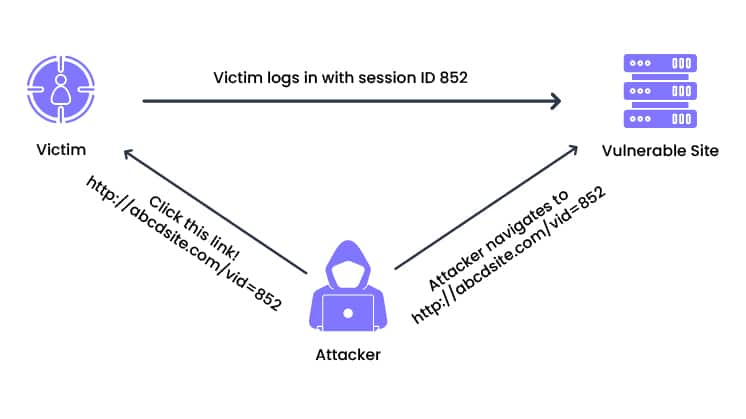
Unlike other methods of session hijacking, session fixation does not require the attacker to guess or steal an existing session ID. Instead, they assign a known session ID before the user logs in. Once the user logs in with this ID, the attacker can seize control of the session.
Session fixation lets attackers bypass authentication processes and access the victim’s account or sensitive data. To prevent such attacks, developers should implement strategies like randomizing session IDs, regenerating session IDs upon login, and consistently verifying the validity of session IDs with each request.
2. Session Sidejacking/MITM Attack
Session sidejacking is a form of session hijacking that involves intercepting a user’s network traffic. Attackers often achieve this through a man-in-the-middle (MITM) attack or by exploiting unsecured Wi-Fi connections.
Cybercriminals use packet sniffing to monitor a user’s traffic in order to hijack their sessions. If a website uses outdated SSL protocols, attackers can steal session keys and hijack user sessions, impersonating them on the website.
During a session sidejacking attack, the hacker intercepts the data transmission between the user’s web browser and the website’s server to capture session cookies.
When users log into a website over an unsecured Wi-Fi connection, attackers intercept this communication and capture session cookies. By using these cookies, the hacker can take over the user’s session and get access to their accounts.
3. Cross-Site Scripting XSS
Cross-site scripting (XSS) is another technique attackers use to hijack user sessions by exploiting vulnerabilities in a web server’s security. In an XSS attack, the attacker injects malicious scripts into web pages that users visit. When a user clicks on a malicious link, their personal information gets redirected to the attacker.
XSS attacks often succeed when web applications or websites lack proper data sanitization. Although HTTP-only cookies are designed to prevent client-side scripts from accessing them, XSS can still pose a significant threat if these protections are not implemented correctly.
To protect your WordPress site from XSS attacks, make sure that all input fields are properly sanitized and validated. Implementing Content Security Policies (CSP) can also help mitigate the risks associated with XSS attacks.
4. Malware Injection
Malware is a type of computer software that is designed to harm or exploit computer systems, networks, or devices. It includes various types of harmful programs such as viruses, worms, trojans, and ransomware. Malware often operates secretly, compromising system security and stealing sensitive information.
In the Malware Injection technique, attackers install malware on a victim’s device to enable session hijacking. Once the malware has been installed, the hacker can capture network traffic and steal session cookies by automating session sniffing. The most prominent example of malware is the SocGholish JavaScript, which can secretly enable session hijacking attacks.
5 Easy Steps to Prevent WordPress Session Hijacking
To prevent WordPress session hijacking, you need to implement a series of proactive security measures. Here are five effective steps that you can take right now to protect your website:
Step #1: Install WAF (Web Application Firewall)
A Web Application Firewall (WAF) is key for defending against session hijacking. It monitors incoming traffic for suspicious activity and blocks malicious requests that could take advantage of vulnerabilities in your site’s code.
Firewalls such as MalCare, Wordfence, Jetpack, etc., are designed to filter out harmful traffic and safeguard against attacks aimed at stealing cookies or session IDs. By enforcing security rules and policies, a WAF adds an additional layer of protection that helps prevent unauthorized access to your site.
Step #2: Enable SSL Encryption for Your Website
Secure Sockets Layer (SSL) secures data transmission between users and servers via strong encryption. This encryption makes it quite difficult for hackers to eavesdrop and steal sensitive information.
So, you should ensure that your WordPress site is accessible via HTTPS to provide encrypted connections for user sessions. Most major web hosting services offer free SSL certificates, simplifying the process of securing your site.
Step #3: Implement 2FA (Multi-Factor Authentication)
Two-factor authentication (2FA) adds an extra layer of protection to user accounts by requiring a secondary form of verification beyond the password. This additional step significantly enhances account protection.
Many WordPress security plugins support 2FA, which you can easily integrate into your site. With 2FA enabled, even if an attacker manages to obtain a password, they would still need the second authentication factor to gain access.
Step #4: Make Sure Your WordPress is Up-to-Date
To maintain optimum security for your WordPress site, regularly update your WordPress core, plugins, and themes. These updates often include important security patches that address known vulnerabilities. Outdated software can be an easy target for attackers. If possible, set up automatic updates and check for manual updates weekly.
NOTE: Always backup your site before applying any updates to ensure you can restore it if needed.
Step #5: Keep Users and Administrators Well-Informed
Awareness is critical to preventing session hijacking. Educate your users and administrators about security best practices, such as:
- Using unique and strong passwords.
- Avoiding suspicious links and downloads.
- Regularly updating WordPress core, themes, and plugins.
- Staying informed about potential security threats.
- Practicing safe browsing habits.
Regular security training and updates can help keep everyone informed and vigilant. Additionally, remind users to keep their browsers up to date, as outdated browsers can create vulnerabilities that hackers might exploit.
By following these steps, you can significantly reduce the risk of session hijacking and improve the overall security of your WordPress site.
Final Remarks on WordPress Session Hijacking Attacks
Session hijacking can lead to severe consequences, including unauthorized access to sensitive information, financial loss, and reputational damage. Attackers who gain control over a user’s session can misuse it to steal data or execute harmful actions.
To prevent WordPress session hijacking attacks:
- Implement robust security measures.
- Regularly update your WordPress core, themes, and plugins to patch vulnerabilities.
- Use SSL encryption to protect data transmissions and enable two-factor authentication for added security.
- Educate users and administrators on safe browsing practices and install a Web Application Firewall (WAF) to block malicious traffic.
In case of a session hijacking incident, consider using the Password Protected plugin. This plugin allows you to restrict access to your site, which prevents new users from logging in until the issue is resolved.
By taking these preventive and responsive measures, you can protect your WordPress site against session hijacking attacks.
Frequently Asked Questions
How do attackers attack in session-hijacking?
Attackers hijack sessions by stealing a user’s session ID with techniques such as session fixation, session sidejacking (MITM attacks), cross-site scripting (XSS), or malware injection. They use the stolen session ID to gain unauthorized access to the user’s active session.
Is HTTPS secure enough to prevent session hijacking?
HTTPS encrypts data transmitted between the user’s browser and the server, which makes it very difficult for hackers to intercept session IDs. While HTTPS significantly reduces the risk of session hijacking, it doesn’t completely eliminate it, so additional security measures are still necessary.
Is it possible to hack PHP sessions?
Yes, you can hack PHP sessions by exploiting vulnerabilities like insecure coding practices, a lack of encryption, or server misconfigurations. A strong security policy and regular software updates can minimize this risk.
What is the solution to a session hijacking attack?
To prevent session hijacking, you must:
- Use HTTPS.
- Enable two-factor authentication.
- Install a Web Application Firewall (WAF).
- Keep software updated.
- Educate users about security practices.
In case of a session hijacking attack, use plugins like Password Protected to lock down your site until the issue is resolved.