

Ransomware and malware are two of the most significant cyber threats businesses and individuals face. While they may share similarities, these malicious programs have different purposes and impacts.
Understanding the ransomware vs malware debate is essential to safeguarding your digital assets and implementing effective cybersecurity measures.
In this article, we will discuss the malware vs ransomware comparison, their behaviors, impacts, and the ways they spread, providing you with actionable insights to protect yourself and your organization from these threats.
Ready? Let’s get started!
What is Ransomware?
Ransomware is a type of malware that cyberattackers use to hold your digital assets hostage and demand a ‘ransom’ to regain access to them. In 2023, the average cost per incident was $1.85 million.
It is a deadly attack that can even lead businesses to cease operations. If cyber attackers find that you are willing to pay a ransom, they will repeatedly target your website or online store, which can eventually lead to bankruptcy.
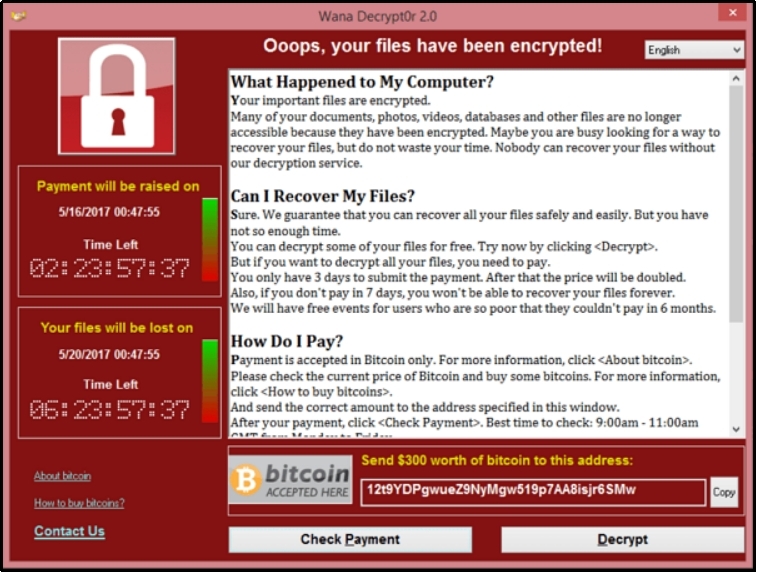
In 2017, a WannaCry named ransomware was spreading. The ransomware demanded $300-$600 worth of bitcoin to be sent to a specified address. The ransomware is known by many other names, including Wana Decrypt0r 2.0, WannaCrypt0r 2.0, WannaCrypt, WCry, and Wanna Decryptor.
Upon confiscating the computer, the ransomware would show a screen like this:
Source/Upguard
Most ransomware attacks show similar screens and demand similar prices, usually in cryptocurrencies. However, the price may also depend upon the business or organization.
These attacks limit the time required to pay the ransom. If one fails to pay the amount needed in the given time, the amount rises.
What is Malware?
Malware, short for malicious software, refers to any software developed to cause harm, exploit vulnerabilities, steal information, or disrupt the normal functioning of devices, networks, or systems. Hackers develop these malicious software, and there are over 1.2 billion malware roaming the internet today.
Around 190,000 new malware attacks happen every second. Moreover, malware can have significant impacts on individuals and organizations. These impacts can range from financial losses to reputational damage and operational disruptions. Here’s a breakdown of the impacts of malware:
- Financial Loss. As discussed earlier, ransomware is a type of malware that can cause serious financial loss to the affected business or organization. Hackers can demand thousands of dollars as a ransom for decrypting files. Moreover, Trojan horse malware can steal bank account credentials, allowing hackers to transfer the amount to their accounts. Lastly, malware removal and recovery can also be expensive.
- Data Theft. Malware can also steal sensitive data. Common types of malware, like spyware and keyloggers, can access personal, financial, or business-critical information by analyzing the keystrokes on the keyboard.
- Operational Disruption. Malware can cause systems to be inoperable, which can lead to interruptions in operations. Eventually leading to loss of business and sales. Also, viruses like botnets and worms multiply themselves to infect more systems in the same network. This multiplication requires bandwidth, which can slow down your device and cause other difficulties.
- Privacy Violations. Spyware can monitor user activities, including keystrokes, screen activity, and webcam access. This can be a threat to your sensitive personal or organizational data, as it can be leaked or sold.
- Damage to Reputation. Malware attacks also cause a loss of trust. Customers will have a hard time trusting a company that causes exposure to their personal data.
Ransomware vs Malware: Main Differences
Here is a concise table to help you understand how malware differs from ransomware.
| Malware | Ransomware |
| It refers to any type of malicious software designed to harm a device or server, exploit vulnerabilities to inject malicious scripts, or to steal sensitive information. | It is a type of malware specifically designed to encrypt files and demand a ransom for decryption. |
| It is used for various reasons, including damaging systems, stealing data, spying on users, or disrupting operations. | It is only used to extort the victim’s money by encrypting their files. |
| Examples include Worms, Trojans, Spyware, Adware, Rootkits, Botnets, etc. | Examples include WannaCry, CryptoLocker, LockBit, REvil, etc. |
| Malware can operate undetected, like a Trojan horse virus that can reside in your device for a long time without you even noticing. | Ransomware is usually highly visible, with a ransom note displayed prominently. |
Ransomware vs Malware: How Do These Viruses Spread?
Although there are differences, they spread similarly. Here’s how malware vs ransomware spread.
- Phishing Emails. Cyberattackers may send you an email with malicious attachments or links that may look legitimate but can be malicious attacks. Once you click the link, the ransomware or malware can crawl to your device and cause catastrophic damage.
- Malvertising. Sometimes, hackers put legitimate-looking banner ads on legitimate-looking websites. These advertisements exploit your browser’s vulnerabilities and inject malware into your device even if you don’t click on them.
- Exploiting Vulnerabilities. Many ransomware enter your device by exploiting unpatched software or operating system vulnerabilities. The WannaCry ransomware we discussed earlier exploited an outdated Windows version’s vulnerability to enter the victim’s device.
- Remote Desktop Protocol (RDP) Attacks. Cybercriminals gain unauthorized access through weak or exposed RDP credentials using brute force attacks and install malware.
- Peer-to-peer Sharing. Hackers may also attack while sharing files from peer-to-peer using unsafe networks.
- Unsafe Third-party Sources. Downloading files from unsafe third-party sources can become a gateway for ransomware and other malicious viruses.
- Infected USB Drives. Perpetrators may also leave infected USB drives or storage devices to lure people into using them on their devices. Once they use it on their devices, the malicious software crawls to the device and encrypts the data.
- Botnets or Worms. Malware like Ransomware and Petya can also spread automatically across networks via self-replicating mechanisms called botnets or worms. These malware types use this mechanism to infect more systems on the same network.
- Illegitimate Software Updates. Hackers can also trick victims into downloading ransomware disguised as legitimate software or updates. For instance, a visitor lands on a website, and a pop-up appears stating their software is outdated and that updating it can prevent cyber threats. When they click the link to update the software, malicious software can spread to the victim’s device.
- Supply Chain Attacks. Cyberattacks can also infiltrate trusted companies or organizations and distribute malware to their users. These attacks are easier to carry out as victims do not suspect anything because of trust in the company or organization.
- Social Engineering. Social engineering includes manipulating victims into taking actions that lead to malware infections. Hackers may pose as your trusted source or your ally and lure the victim into doing activities that can allow the attacker to inject your device with malicious software.
7 Tips to Protect Yourself Against Malware and Ransomware
Protecting yourself and your business from malware is essential to mitigate the risk of losing heaps of cash to decrypt your files. Here are the safety measures you can take today to protect your business from malware and other cyberattacks.
#1: Keep Your System Updated
Malware often exploits vulnerabilities in outdated versions. Thus, regularly updating your software is necessary. Moreover, software updates usually come with security patches and other fixes for known weaknesses.
Cyber threats are evolving. Hackers work tirelessly to find vulnerabilities in software and systems so they can exploit them to gain unauthorized access or to inject malicious software like ransomware. And to mitigate the risk of getting injected with such malware, it’s imperative to look for updates regularly.
#2: Use Strong and Unique Passwords
Weak passwords can allow hackers to perform password-guessing attacks on your website or devices and gain unauthorized access. Later, they can install ransomware to encrypt your file and ask for tons of cryptocurrencies for decryption.
To mitigate this risk, avoid common password mistakes and follow the best password practices. Ensure your password is long enough and contains special characters that are difficult to guess; do not use common dates like your or your loved one’s birthday.
#3: Enable Two-factor Authentication (2FA)
Two-factor authentication or 2FA (or multi-factor authentication) can be an excellent addition to your security plan. This extra protective layer prevents access even if the hacker somehow compromises your password. For WordPress, you can use a plugin like All In One Login.
#4: Regularly Backup
Regular backups are a vital part of cybersecurity. Let’s establish that after an unfortunate event, your website is compromised, and the hacker demands a high amount of ransom. You can simply overcome the demand by loading a previous backup, helping you regain access to your website without paying the ‘ransom.’
#5: Be Conscious Before Replying to Emails
Earlier, we discussed ransomware and malware spreading by emails. Therefore, you must be mindful before responding to emails or downloading any file attached to the email. These files often contain malicious software like ransomware or trojan horse virus.
Before responding to an email, ensure it is not phishing. Always check:
- The sender’s address. Spammers usually have relatively long gibberish emails.
- Sense of urgency. Such attackers also spark a sense of urgency to entice victims to take immediate action. If the email wants you to take immediate action and discloses severe consequences for not complying with the requests, it is a prominent sign of a cyberattack.
- Check the Link destination. Instead of clicking over the link, copy it and paste it into Google’s Transparency Tool, which validates a link’s authenticity.
- Check for SSL. You should not click the incoming link, but if you did and landed on a website that is not secured and does not have SSL, leave the page immediately. Unsecured websites without SSL can steal your information or download malicious scripts on your browser.
#6: Avoid Downloading From Third-Party Sources
Many third-party sources offer software at a fraction of the price of what they actually cost. Although the offer seems enticing, these kinds of offers are only to lure victims into downloading the software. Once downloaded on the victim’s device, the malicious software begins its operations, causing distribution of operations, encrypting files, or stealing information.
Therefore, always look for official sources for downloading software and refrain from claiming an offer that sounds too good to be true.
#7: Educate Your Employees and Other Admins
Securing an organization or a business is a team sport. Your employees or even users not following the best practices can let ransomware or other malware in.
Therefore, it’s important to educate the employees and other admins about the best cybersecurity practices and how to spot fraudulent or fake emails. Educating your employees and others ensures everyone is on the same page and prevents malware, unauthorized access, and ransomware.
Final Remarks —Ransomware vs Malware
Cybersecurity is an ever-evolving discipline. As discussed earlier, hackers work tirelessly to find vulnerabilities and develop software to harm a business or steal sensitive information. Therefore, regularly twitching your security protocols to protect against the latest cyber attacks is necessary.
In this ransomware vs malware guide, you’ve learned that ransomware is a kind of malware that is used to encrypt a victim’s file so that the hacker can demand a large amount of ransom.
To protect yourself from ransomware and malware, keep your software updated, use strong and unique passwords, enable multi-factor authentication, regularly back up your website, and avoid downloading files or software from third-party sources.
Lastly, do not forget to educate your employees and other admins about the best cybersecurity practices to ensure none of the users is creating vulnerabilities that cyberattackers can exploit.
In case of a malware attack (until the problem is resolved), we recommend you keep your WordPress site private using the Password Protected plugin.
Frequently Asked Questions — Ransomware vs Malware
Are ransomware and malware the same?
No! Ransomware is a kind of malware, and malware refers to a broad category of malicious software created to do harm to websites or steal sensitive information.
What is the difference between ransomware and spyware?
Spyware secretly infiltrates a user’s device and then collects sensitive personal information such as keystrokes, screenshots, login credentials, browsing history, etc., without the user’s knowledge, and sends that data to a hacker. In contrast, ransomware encrypts files and asks for ransom for the decryption key.
Can ransomware be removed?
Yes! Resetting your device to factory or default settings or formatting your hard drives can help you get rid of ransomware. Later, you can load your previous backup to avoid paying ransom.
Does ransomware always demand payment in cryptocurrency?
No, although this is true in most cases, sometimes attackers may also demand payment in fiat currencies through wire transfers. Attackers usually use cryptocurrencies because they provide anonymity. It usually depends on the attacker how they want to receive the ransom.