

Get aware of these types of website attacks to prevent WordPress hacking.
WordPress is the world’s most widely used content management system (CMS), powering over 45% of all websites.
However, this also makes it a prime target for hackers and malicious actors who want to exploit its vulnerabilities and compromise its security. WordPress attacks can cause serious damage to your website, such as data loss, malware infection, reputation harm, legal issues, and more.
Fortunately, you don’t need to worry, as there are many ways to secure your WordPress site. Throughout this article, we will explain what a WordPress attack is. The 5 most common WordPress attacks and how you can avoid them are by following some best practices and using some reliable tools.
Ready? Let’s dive right in!
What is a WordPress Attack?
A WordPress attack is any attempt to gain unauthorized access to your WordPress website, database, files, or server. Hackers can use various methods and techniques to exploit the weaknesses and loopholes in your WordPress installation, plugins, themes, or hosting environment.
Some of the common objectives of WordPress attacks are:
- Stealing sensitive information, for example, user credentials, personal information, payment details, etc.
- To inject malicious code into your website or server, like malware, ransomware, backdoors, etc..
- The redirection of your site’s traffic to other websites, namely phishing sites, spam sites, competitor sites, etc.
- To deface your website, such as changing your content, images, logo, etc.
- Use your website or server as a part of a botnet by launching distributed denial-of-service (DDoS) attacks, spamming, mining cryptocurrency, etc.
- In order to damage your reputation, such as by sending spam emails or displaying offensive or illegal content
WordPress attacks can have serious consequences for your website and your business. They can affect your website performance, functionality, usability, and SEO. Aside from that, WordPress hacking can expose you to legal liabilities, fines, lawsuits, and penalties. Moreover, they can undermine your credibility and trust among customers, visitors, and partners.
List of 08 Most Common WordPress Attacks and How You Can Avoid Them
Now that you’ve understood what a WordPress attack is and how devastating it can be for your website. Let’s check out the eight most common WordPress attacks and how you can avoid them:
WordPress Attack #1: Brute Force Attack
A brute force attack is a trial-and-error method of guessing your WordPress login credentials, such as your username and password. Hackers use automated tools or bots to try thousands of combinations of usernames and passwords until they find the right one. Once they have logged in to your WordPress dashboard, they can do whatever they want with your website.
How to Protect Your WordPress Site from Brute Force Attack
To prevent brute force attacks, follow the below precautions:
- Use a Strong and Unique Password: Use a mixture of numeric and alphabetic characters and avoid dictionary words and words related to your site. Also, change your password regularly and avoid using the same password for multiple accounts.
- Don’t Use Default Username: By default, your username is “Admin,” but you must change it as early as possible. To do so, use a plugin like Username Changer.
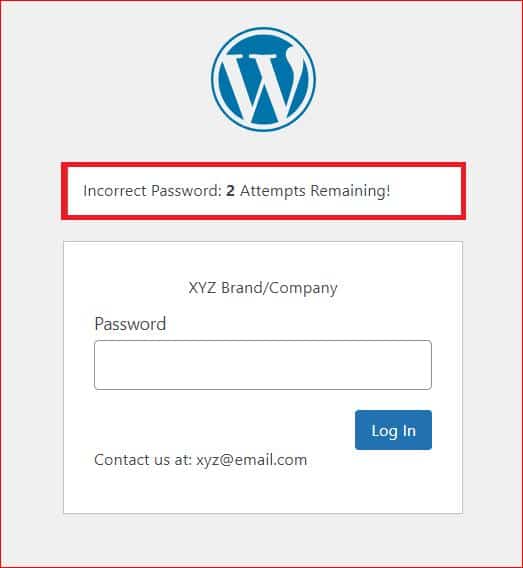
- Implement Limit Login Attempts: You can use a plugin like Limit Login Attempts Reloaded to set a maximum number of failed login attempts before blocking the IP address or device for a certain period of time.
- Enable Two-Factor Authentication (2FA): This provides an additional layer of protection by requiring a verification code or a device confirmation along with your username and password. To enable 2FA, install the All-In-One-Login plugin on your site.
If you want to protect your password protected site against brute force attacks, then use the limit login feature of the password protected plugin, which allows you to limit the number of attempts a single user can make in a certain period.
WordPress Attack #2: Phishing Attack
Phishing attack refers to a type of cyberattack that targets people by sending them malicious emails, messages, or websites and asking for sensitive information like login credentials. Sometimes, bad actors even use hacked WordPress sites to pull off these tricks.
In January 2022, a vulnerability in the WP HTML Mail plugin put more than 20,000 WordPress sites in danger. This issue allowed attackers to put harmful code on the websites and send out fake emails that looked real, tricking people into giving away their information.
Prevention Tips for Phishing Attack
If Google detects phishing scams on your site, you could get blocklisted and lose customer trust. So, to protect your WordPress site from phishing attacks, consider the following guidelines:
- Use WordPress security plugins to monitor your site activity and block suspicious users.
- Keep your WordPress installation, plugins, and themes up-to-date to patch known vulnerabilities.
- Educate your users about the risks of phishing attacks and how to identify them.
- Regularly scan your site for malware and other security threats.
Taking these precautions can help safeguard your WordPress site from phishing attacks and protect your users’ sensitive information.
WordPress Attack #3: Distributed Denial-of-Service (DDoS) Attack
Another commonly occurring WordPress attack is the Distributed Denial of Service (DDoS) attack. DDoS attack happens when a hacker sends a ton of fake traffic to servers, which causes the servers to crash, resulting in downtime for all websites hosted on them.
WordPress DDoS attacks can make your website inaccessible, causing downtime, which creates a bad reputation for your business. Usually, hackers go after sites with weak security in their hosting.
Back in 2014, over 162,000 WordPress sites were taken over for a DDoS attack by messing with their XML-RPC setups. More recently, in 2022, some websites in Ukraine got hit with a DDoS attack that used hacked WordPress sites.
Signs of DDoS Attack:
Here are signs that your site might be going through a DDoS attack:
- Your website is running much slower than it usually does.
- The website is completely unavailable.
- There is a lot of unusual CPU and bandwidth consumption on your website.
How to Protect WordPress Site from DDoS Attack
To keep your site safe from DDoS attacks, use a plugin that monitors and identifies suspicious activity, and one of those plugins is the WP Activity Log. It keeps track of changes to your website and notifies you whenever files are added, changed, or deleted.
Also, it’s a good idea to opt for reliable web hosting for WordPress. Picking a trustworthy provider with solid security features can help keep your site safe.
WordPress Attack #4: SQL Injection Attack
WordPress uses a database and PHP server-side scripts to make websites fast and easy to use. However, this setup also makes WordPress vulnerable to SQL injection attacks.
An SQL injection attack happens when an attacker injects harmful code into a website’s database. A hacker could use this code to get sensitive info or even take control of the whole website.
In January 2023, popular WordPress plugins such as Easy Digital Downloads, Paid Membership Pro, and Survey Maker were found to have these vulnerabilities, putting more than 150,000 sites at risk. Several days earlier, the US government’s National Vulnerability Database warned about a similar issue with the Popup Maker plugin, risking over 700,000 sites.
How to Protect WordPress Site from SQL Injection Attacks
Here are a few tips for preventing SQL injections on your site:
- Keep your WordPress version up to date. Older versions may have weak points.
- Use tools like WordPress Security Scan to find and fix vulnerabilities on your site.
- Update your PHP version (used by your hosting server) for better security.
- Update your plugins and themes regularly.
If a plugin or theme isn’t getting updates anymore, switch to a different one that is still maintained.
WordPress Attack #5: Plugin and Theme Vulnerabilities
Plugins and themes are fantastic ways to add cool features or a unique style to your WordPress site. However, they can also be a common target for hackers as they rely on developers to keep up to date with security weaknesses and exploits.
If you don’t keep your plugins up to date, your site might be at risk of an attack. To keep your website safe against plugins and theme vulnerabilities, follow these tips:
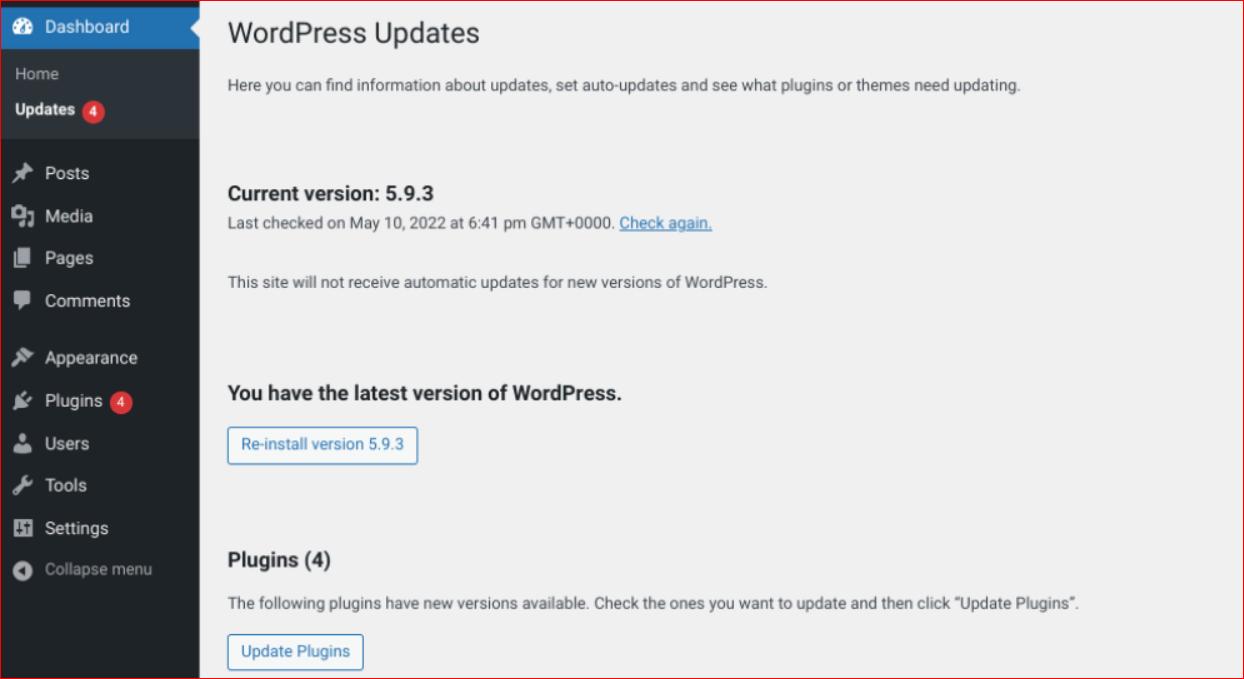
- Always Update Your Plugins: Go to your WordPress dashboard, and under “Dashboard,” click on “Updates.” This way, you can easily see if any of your plugins need updating.
- Watch Out for Old Plugins: Whenever a plugin hasn’t been updated for six months, chances are the developer has stopped working on it. These kinds of plugins are more likely to have security problems, so it’s better to avoid using them altogether.
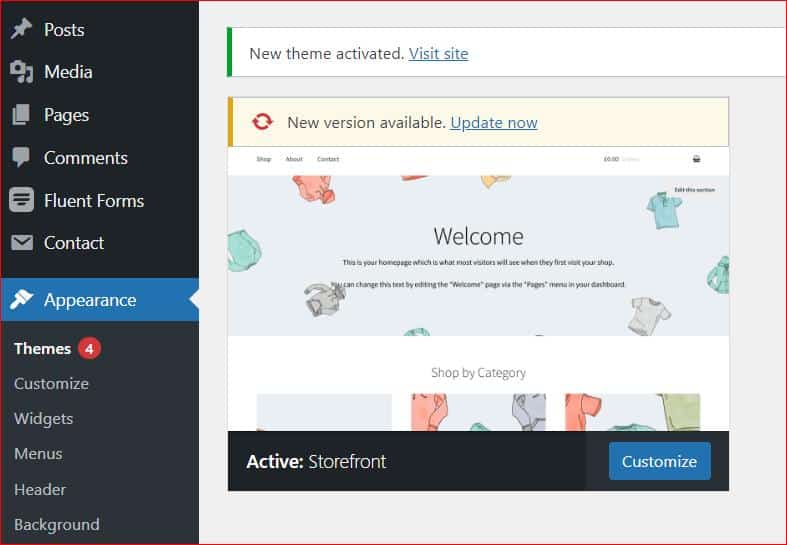
- Update Your Website’s Theme: Go to Appearance → Themes on the right-hand side menu of your WordPress dashboard. And click on the “Update Now” button where it says “New version available.”
By following these tips, you can help minimize the risk of plugin and theme vulnerabilities in your WordPress site.
WordPress Attack #6: Session Hijacking Attack
A session hijacking attack happens when an attacker steals or intercepts a user’s session ID or token, allowing them to take over the user’s active session. Once the attacker gains access, they can impersonate the user and perform actions on their behalf, potentially compromising sensitive data or making unauthorized changes to the website.
In May 2023, a significant security flaw was discovered in the Beautiful Cookie Consent Banner plugin, which left over 1.5 million WordPress sites vulnerable to session hijacking attacks. This vulnerability allowed attackers to inject malicious code and hijack user sessions, putting countless websites at risk.
Signs Your Site Might Be Under a Session Hijacking Attack:
- Users report unauthorized access or suspicious activity in their accounts.
- Unusual or unexpected changes appear in your website logs.
- Admin or user accounts show login patterns that don’t match normal behavior.
How to Protect Your WordPress Site from Session Hijacking Attacks:
- Use HTTPS Encryption: Always secure your website with HTTPS to encrypt communication between the user’s browser and your server. This makes it significantly harder for attackers to intercept session data.
- Set Session Timeout Limits: Configure your website to automatically log users out after a period of inactivity. This reduces the risk of an attacker hijacking an active session.
- Enable Two-Factor Authentication (2FA): Add an extra layer of security by requiring users to verify their identity through a second factor, such as a code sent to their mobile device, in addition to their password.
- Monitor Login Activity: Regularly check your website logs for unusual login patterns or suspicious activity. Plugins like All-In-One-Login can help you track and identify potential session hijacking attempts.
- Keep Plugins and Themes Updated: Outdated plugins and themes are common entry points for attackers. Regularly update all components of your WordPress site to patch known vulnerabilities.
WordPress Attack #7: Spam Link Injection Attack
A spam link injection attack occurs when hackers insert unwanted or malicious links into your website’s content or code. These links often redirect users to unrelated, low-quality, or even illegal websites. The primary goal of such attacks is to exploit your site’s SEO and ranking to benefit the attacker, but they end up damaging your website’s reputation, SEO performance, and user experience.
In October 2023, the Balada Injector campaign targeted vulnerabilities in the tagDiv Composer plugin, compromising over 17,000 WordPress sites. Visitors to these hacked sites were redirected to fake tech support pages, fraudulent lottery win announcements, and other scam-related content.
Symptoms of Spam Link Injection:
- Unauthorized or suspicious links suddenly appear in your website’s content or code.
- A noticeable drop in search engine rankings due to penalties for spammy links.
- Increased traffic to unrelated or low-quality websites through injected links.
- Users report being redirected to strange or irrelevant pages.
How to Protect Your WordPress Site from Spam Link Injection Attacks:
- Regularly Scan Your Website: Use security plugins like Wordfence or Sucuri to scan your website for malicious code or unauthorized links. These tools can help you detect and remove spam links before they cause significant damage.
- Update Plugins and Themes: Outdated plugins and themes are common targets for attackers. Always keep your WordPress plugins, themes, and core files updated to patch known vulnerabilities.
- Monitor User Activity: Restrict user permissions and monitor activity logs to identify any unauthorized changes to your website’s content or code. Plugins like All-In-One-Login and WP Activity Log can help you track modifications in real time.
- Use a Web Application Firewall (WAF): A WAF can block malicious traffic and prevent hackers from injecting spam links into your website. Many hosting providers offer built-in WAF solutions, or you can use third-party services like Cloudflare.
- Check for Unusual Redirects: Regularly test your website for unexpected redirects. If users are being sent to unrelated or suspicious pages, investigate and address the issue immediately.
By taking these steps, you can protect your WordPress site from spam link injection attacks and maintain its SEO performance, user trust, and overall security. Stay proactive and vigilant to keep your website safe from such threats.
WordPress Attack #8: Cross-Site Request Forgery (CSRF) Attack
A Cross-Site Request Forgery (CSRF) attack tricks authenticated users into performing unintended actions on a web application without their knowledge. This type of attack occurs when a logged-in user visits a malicious website, which then sends unauthorized requests to the target website using the user’s active session. These requests can lead to changes in user settings, data, or even account compromises.
In February 2023, a CSRF vulnerability was found in the Forms by CaptainForm plugin, exposing over 10,000 WordPress sites to potential attacks. This flaw allowed attackers to manipulate user actions, putting sensitive data and website functionality at risk.
Signs of a CSRF Attack:
- Unexpected changes to user accounts, settings, or data without the user’s consent.
- Suspicious activities recorded in server logs, indicating unauthorized actions.
- Users report actions they did not initiate, such as password changes or unauthorized purchases.
How to Protect Your WordPress Site from CSRF Attacks:
- Validate Referer Headers: Configure your website to check the referer header of incoming requests. This helps confirm that requests originate from your own domain, adding an extra layer of protection against CSRF attacks.
- Use Security Tokens: Implement anti-CSRF tokens in your forms and requests. These tokens are unique to each session and verify that the request comes from a legitimate source, preventing attackers from forging requests.
- Enable Content Security Policy (CSP): Use security headers like Content Security Policy (CSP) to restrict the sources of executable scripts and reduce the risk of CSRF attacks. This limits the ability of malicious websites to send unauthorized requests.
- Conduct Regular Security Audits: Perform security audits and penetration testing to identify and fix potential CSRF vulnerabilities. Tools like WPScan can help you detect weaknesses in your WordPress site.
- Limit User Permissions: Restrict user roles and permissions to minimize the impact of a CSRF attack. For example, only allow trusted users to perform critical actions like changing settings or updating plugins.
Final Thoughts on 08 Most Common WordPress Attacks
If you own a WordPress site, then you must be aware of different types of WordPress attacks because these attacks are a serious threat to your website’s security and integrity. Therefore, preventing WordPress attacks and securing your website from hackers is crucial.
Identifying the different types of WordPress attacks, such as Brute force attacks, SQL Injections, DDoS attacks, Phishing attacks, or even plugin and theme vulnerabilities, will enable you to protect your website against WordPress attacks and website defacement and ensure its safety and performance.
Lastly, if you want to password protect your WordPress site dashboard and content, check out our free-to-use Password Protected plugin and confidently keep your WordPress site safe from unauthorized access.
Frequently Asked Questions
What is the most significant danger in WordPress site security?
The most significant danger in WordPress site security is the risk of malware infections, which can lead to data breaches, website downtime, and loss of user trust. Hackers can inject malware into your website by exploiting vulnerabilities in WordPress core, plugins, and themes.
How do I prevent malware on WordPress?
To prevent malware on WordPress, follow these steps:
- Keep your site up to date with the latest security patches.
- Use strong passwords and limit user access.
- Install a reputable security plugin, such as Wordfence or Sucuri.
- Regularly scan your site for malware and vulnerabilities.
- Use a web application firewall (WAF) to block malicious traffic.
- Limit access to your WordPress admin area.
- Use trusted WordPress themes and plugins.
What to do if WordPress site is hacked?
Once your WordPress site has been hacked, you should take immediate action to recover and clean your site. Here are some steps you can follow to fix a hacked WordPress site:
- Put your WordPress site in maintenance mode to prevent further damage and alert your visitors.
- Reset your WordPress password and remove any suspicious users with admin privileges.
- Update your WordPress core, plugins, and themes to the latest versions.
- Reinstall WordPress core files from a fresh copy.
- Clean your site by removing malware and restoring any lost data.
- Implement additional security measures to prevent future attacks.
How many times have WordPress sites been hacked?
According to security reports by WordFence, WordPress websites face a high frequency of attacks, with nearly 90,000 attacks per minute. Another study identified 3,972 known vulnerabilities in WordPress, with 52% attributed to plugins, 37% to WordPress core files, and 11% to themes.
Is WordPress the most hacked CMS?
Yes, WordPress is the most hacked content management system (CMS). Based on Sucuri’s annual report on hacked websites, 96% of all hacked websites in 2022 were WordPress-based.
Are WordPress sites hackable?
Yes, if your WordPress site is not properly secured, it can be hacked. However, by following best practices and implementing security measures, you can significantly reduce the risk of a successful attack.
How secure is WordPress?
WordPress is generally considered secure, but it can be vulnerable to attacks if you don’t secure your website correctly. The best thing is that to address any vulnerabilities, developers regularly audit and update the WordPress core.