


Maintaining a secure website is essential. But nowadays, it’s definitely not very easy. Cyberattackers continuously find ways to exploit vulnerabilities, often through website backdoors.
These hidden entry points allow unauthorized access, enabling hackers to inject malicious code, steal sensitive information, or compromise your site’s integrity.
Even after rigorous cleaning, these backdoors can expose your website, making it crucial to understand how to identify and eliminate them effectively. This article will dive deep into everything you need to know about website backdoors. Including common signs your site might be compromised and actionable steps to secure your website.
Let’s get started!
What are Website Backdoors?
As the name suggests, website backdoors are atypical gateways hackers use to gain unauthorized access, inject malicious scripts, steal sensitive information, install malware or viruses, or anything in general to hurt your website.
Also Read: Malware vs Virus vs Worm: Key Differences and Protection Measures
These gateways—or backdoors—can be a code, an outdated plugin, or a vulnerable theme with a small opening allowing hackers to access your site.
Unfortunately, even if you have cleaned your website a million times, hackers can still come back and cause problems unless you close all the backdoors strategically. And you can rely on us for that!
Keep reading for a perfect way to close all your website’s backdoors.
Does Your Website Have Website Backdoors?
Before you go all in on cleaning the website backdoors, you must check whether your site is affected or not. To do so, look for the signs, such as:
- Getting Hacked Repeatedly: The most prominent sign is getting repeatedly hacked after cleaning the malware numerous times. Simply put, if you can’t stop attackers even after adopting every cyber security best practice, there is most likely a backdoor on your website.
- Unwanted Files: If you find files, such as plugins, themes, code snippets, etc., that you don’t remember installing can be a sign of a website backdoor.
- Unusual Site Behavior: If you find your website acting unusual, such as getting slower all of a sudden, crashing, and causing something it usually doesn’t, that can be a sign of a website backdoor.
- Unexpected Pages or Links: If you see unwanted pages or links that lead to questionable websites, that can be a sign of a backdoor. Cyber Attackers sometimes lure victims into those pages to inject malware.
- Search Engine Warnings: Search engines usually show a “This site may harm your computer” warning. This means the search engine has detected malicious activity on your website, which can be a sign that a hacker is exploiting vulnerabilities in your website.
- Unrecognized Files: It’s not just about plugins and themes but files as well. If you see a file or folder you can’t make sense of, that’s probably a hacker installing malicious files through the backdoors.
- Suspicious User Account: Sometimes, cyber attackers create profiles so that they can easily access your website again and again. If you see a new user that you don’t remember adding, that could have crawled in via a backdoor.
- Questionable Spike or Decrease in Traffic: You may also see questionable changes in your analytics, even if you haven’t done anything that explains the escalation or decrease in the number of visitors.
If you notice these signs, there can be a backdoor that allows hackers to get back to your website repeatedly, even after you have cleaned malware hundreds of times.
How to Eliminate Backdoors in 04 Easy Steps
Now that you know how to spot them, the hardest part is done because spotting one is not very easy. Let’s move on to the elimination. To do so, we will show you 04 simple steps that you can take today to get rid of your website’s backdoors.
Step #1: Make Your Site Private
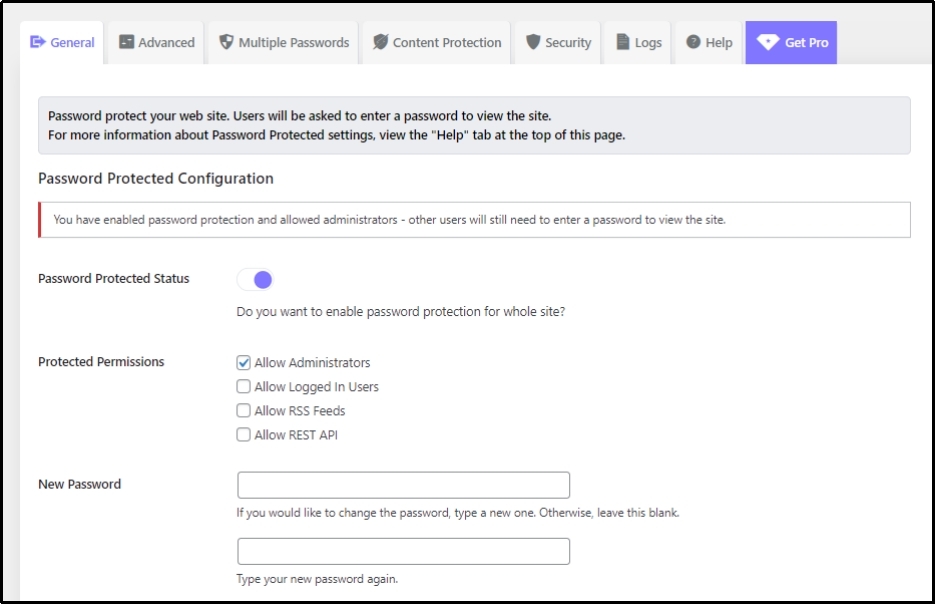
Hackers can easily target a public website but are helpless against a private website. Thus, if you find a backdoor, you should first install Password Protected and make your website private. With over 400k active installs and 4.5 stars on the WordPress plugin’s repository, Password Protected is one of the must-have plugins for WordPress security.
All you have to do is enable the slider and set a new password, and that’s it. Now, every time someone lands on your website, they will need to enter a password to gain access to your website, hence trapping cyber attackers out of your website.
Step #2: Run a Thorough Scan
The next step is to run a thorough scan to ensure your website is clean from any malicious files and codes. Also, make sure to use a reliable cleaner that can spot underlying malware or viruses that are usually harder to catch.
When selecting a malware cleaner, focus on its ability to detect and eliminate malware effectively. Evaluate its user-friendliness, review independent lab test results from credible sources like AV-Comparatives or Virus Bulletin, and verify that it maintains a low false positive rate, indicating it doesn’t mistakenly identify safe files as harmful.
Additionally, consider its compatibility with your operating system and whether it provides real-time protection.
Step #3: Clean The Malware or Remnants
If the scan found the malware, it is imperative to completely clean it before proceeding further. However, if you do not find any threat, you can skip this step.
Most reliable malware detection software allows removal services as well, allowing you to eliminate the detected malware with a few clicks. Ensure that not only malware but also its remnants are completely cleaned. Once done, restore the backup to all the impacted files.
Step #4: Take Safety Precautions to Avoid Reappearance
Congratulations! You just got rid of the website backdoors. But that doesn’t mean they can’t reappear, making it extremely simple for the cyberattacker to hop in and cause harm to your website. Therefore, it’s necessary to take the following safety precautions to prevent them from happening in the future:
- Change Passwords: First things first, ensure to change all your passwords throughout the website. No user should be an exception. If you use plugins like Password Protected to protect your website, change the password for that as well.
- Update Your Software: Every outdated software, including themes, plugins, addons, extensions, and basically everything that goes into maintaining a website, can be a gateway for hackers. Thus, it’s necessary to timely update your software. Moreover, newer software versions usually come with advanced security patches.
- Install a Firewall: A firewall helps filter incoming and outgoing traffic on your website, allowing for a block or banning potential threats.
- Limit Login Attempts: Limiting login attempts also helps with website security. It limits incorrect login attempts, trapping hackers using password-guessing attacks.
- Implementing 2FA or MFA: Multi-factor authentication or two-factor authentication can also help, as it requires the user to authenticate their login attempt with two factors of authentication. This can stop hackers from accessing your password, even if it is cracked or leaked.
That’s pretty much it! Now, the website backdoors can not come back.
Conclusion
Website backdoors can be a serious threat to your site’s security. They allow hackers to exploit vulnerabilities even after repeated cleanups. Identifying these hidden gateways and taking proactive measures to eliminate them is essential to maintaining a secure and trustworthy online presence.
By following the outlined steps—making your site private, running through scans, cleaning malware, and implementing robust security measures like password updates, software updates, firewalls, and two-factor authentication—you can effectively safeguard your website from future breaches.
Remember, cybersecurity is an ongoing process. Regular monitoring, timely updates, and a vigilant approach to potential threats will ensure your website remains secure and resilient against cyberattacks. Protect your digital space today to build a safer and more reliable online future.
Frequently Asked Questions
What is an example of a backdoor?
A website backdoor can be any code snippet that allows unauthorized users to gain high-level user access (also known as root access) to your computer system, network, or software application.
What is the most common backdoor?
The most common backdoor is remote file inclusion (RFI.) This attack exploits vulnerabilities within applications that dynamically reference external scripts. Using RFI, the cyber attacker tricks the referencing function into downloading a trojan horse virus from a remote host.
What is the risk of a backdoor?
A website backdoor can be deadly as it allows full access to cyber attackers, enabling them to steal sensitive information and control your entire system. The backdoor attack can result in data theft, system manipulation, and prolonged network presence without detection.