


Running a small WordPress agency is exciting, but it also comes with a lot of moving parts. Between juggling multiple projects, managing client expectations, and testing new builds, agencies often lose valuable time on repetitive setup tasks. One area where this becomes especially frustrating is site access management.
Think about it: every project has a staging site, revisions to review, and clients who need a simple way to peek in without breaking anything. Setting up user accounts, managing roles, or configuring complex security plugins can consume hours you don’t have.
That’s where the Password Protected plugin shines. It offers a straightforward way to hide a WordPress site behind a password with no heavy configuration or technical barriers.
In this article, we’ll break down five smart ways small WordPress agencies use Password Protected to save time.
Ready? Let’s dive right in.
1. Protecting Staging & Development Sites Instantly
Every agency needs a staging site. It’s where designs take shape, plugins get tested, and new features roll out before clients ever see them live.
The problem is, however, that staging environments are often left wide open, allowing anyone with the link to stumble upon them. Setting up user accounts or advanced access controls just to hide a temporary site can waste valuable time.
The Password Protected plugin solves this with a single setting.
Just turn it on, add a password, and your staging site is locked down within seconds. No need to create accounts, tweak user permissions, or install bulky membership tools.
Look at the screenshot below, which shows the general settings to lock your entire website with a single password.
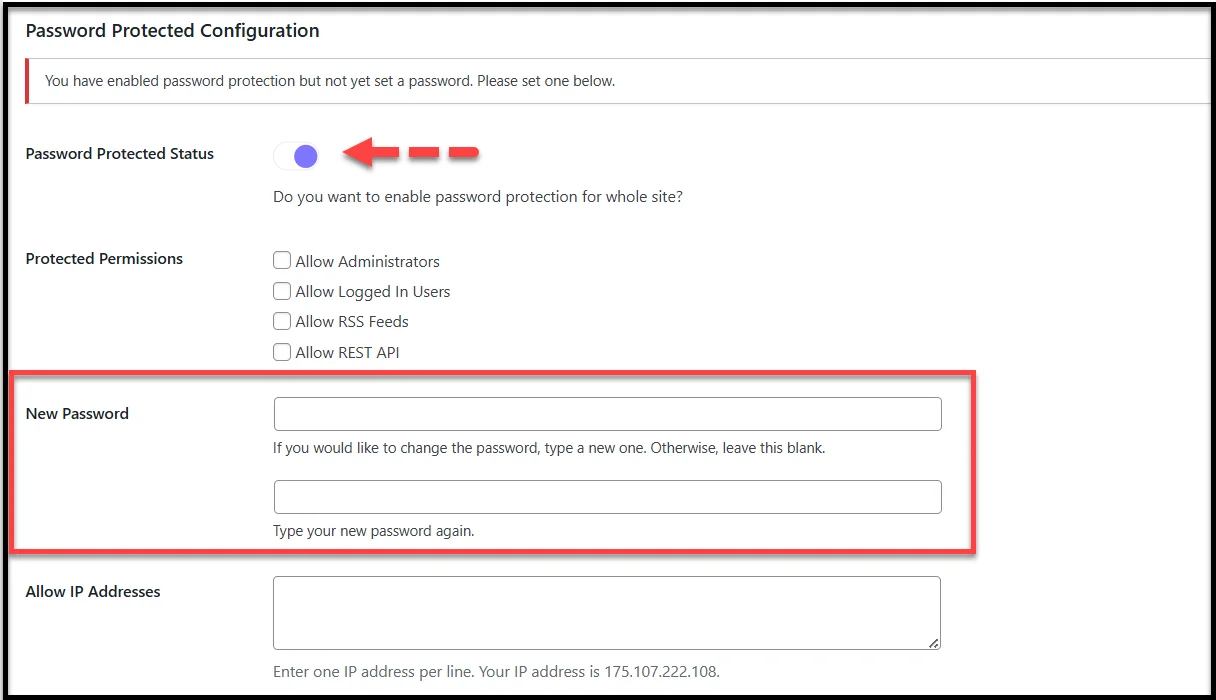
For agencies, this is a game-changer. Developers can work freely, clients only see the site when invited, and there’s zero risk of unfinished projects being indexed by search engines. If you’re working on multiple staging sites across different clients, this quick setup easily saves hours every month.
With Password Protected Pro, you can take it even further. Features like bypass links and user role control let you fine-tune who gets in and who doesn’t without adding extra friction to your workflow.
2. Simplifying Client Previews with Bypass Links
One of the biggest time-wasters for small agencies is dealing with client access. You share a staging site, send them the password, and then comes the flood of emails: “The password isn’t working,” or “I can’t find the login details.” This back-and-forth communication slows projects down and frustrates everyone involved.
With Password Protected Pro, you can skip that headache entirely using Bypass Links. Instead of asking your client to remember or copy a password, you send them a special link that takes them straight into the site. No password screen, no confusion.
You can find the bypass link right where you create a password for your post or page.

This small change has a huge impact. Clients can instantly view progress, give feedback faster, and your team avoids wasting time on unnecessary support emails.
Especially, agencies juggling multiple clients know just how much time and energy this saves.
Bypass links are also flexible; you can generate them for specific clients, set them to expire, or disable them when a project phase is complete. It’s a simple, professional way to keep client communication smooth while keeping staging sites protected.
3. Saving Time with Multiple Passwords for Teams & Clients
Most small agencies start with a single shared password for staging sites. It works initially, but it quickly becomes a hassle. If the password is shared too widely, anyone with the link can get in. If it needs to be changed suddenly, everyone on the team and every client must be updated. That’s a lot of wasted time and confusion.
With Password Protected Pro, you can assign multiple passwords instead of relying on just one. This means your agency can set one password for the development team, another for freelancers, and a separate one for each client. If someone no longer needs access, you simply remove their password without disrupting anyone else.
To create multiple passwords for the entire website, you can use the Multiple Passwords feature.
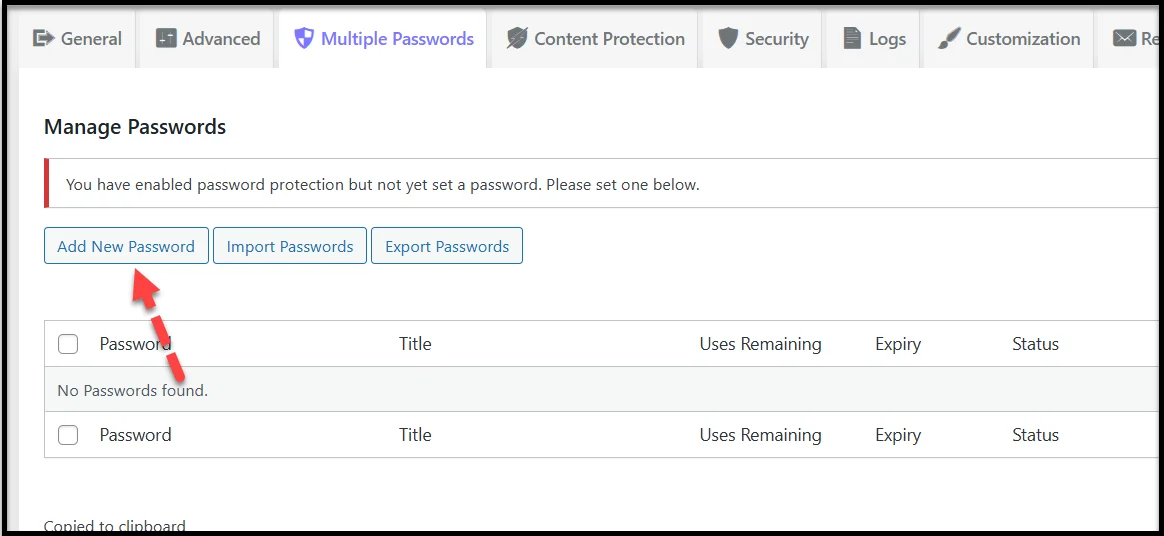
This approach keeps projects organized and secure while cutting down on repetitive communication.
Instead of resetting and resending a single master password, you have full control over who can log in at any given time. For small agencies handling multiple projects, this flexibility saves countless hours across the year.
4. Controlling Access by User Roles During Development
When building a site, not everyone needs the same level of access. Developers may need to test every feature, but clients often only need to see progress once certain parts are polished. If everyone uses the same password, it becomes tricky to control who sees what and when.
This is where Password Protected Pro’s user role restrictions make a big difference. Instead of sharing passwords, you can allow access based on WordPress roles. For example:
- Developers and project managers (with higher roles such as Contributor or Editor) can view the site anytime.
- Clients or Subscriber can only see the site once you grant access to their role.
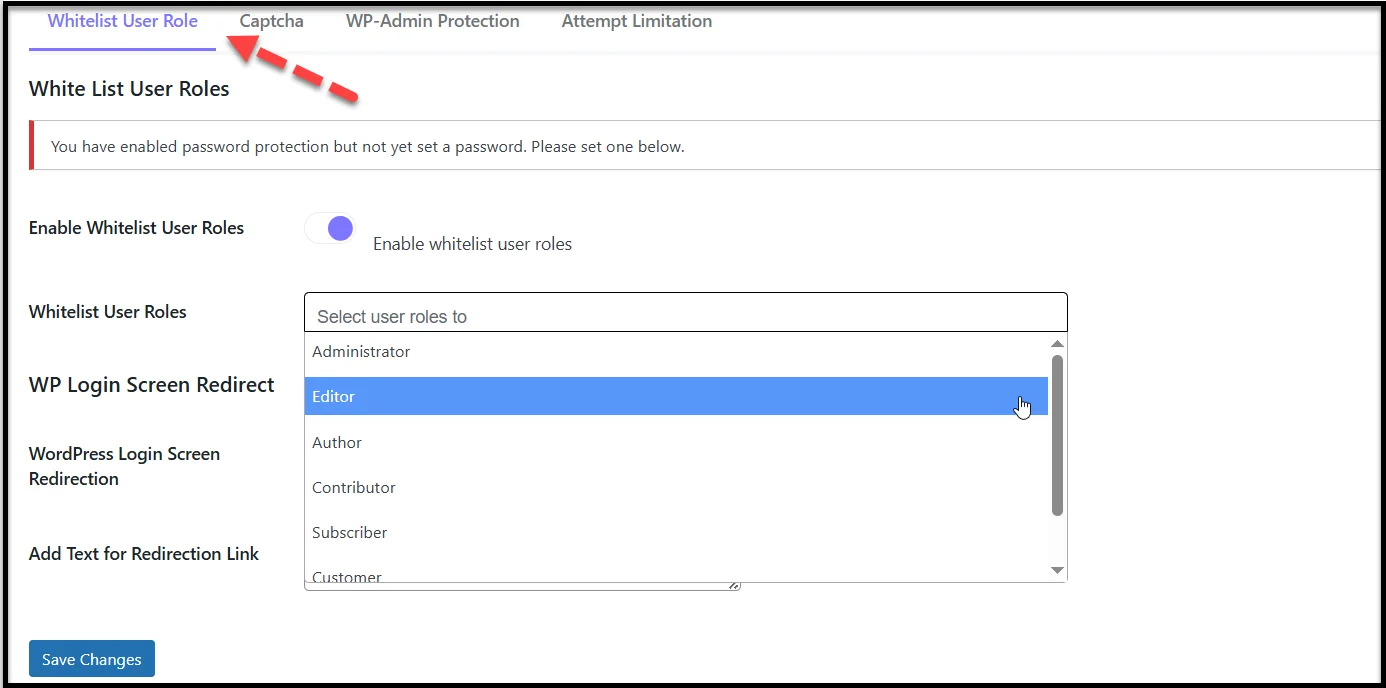
This keeps your workflow cleaner and prevents clients from stumbling onto unfinished sections too early. It also reduces the chance of awkward feedback on work that wasn’t ready for review.
For small agencies that move quickly, role-based access means less micromanaging and more control over the development timeline. It’s a simple setup that helps you keep projects on track without extra communication overhead.
5. Speeding Up Setup Across Multiple Projects with Import/Export Passwords
Small agencies rarely work on just one site at a time. More often, you’re spinning up multiple staging sites, running redesigns, or handling ongoing maintenance for different clients. That means repeating the same access setup over and over, and every repeat task eats into your billable hours.
Password Protected Pro helps cut that cycle short with its Import/Export Passwords feature.
Instead of creating new access settings from scratch for every project, you can export your existing password list and import it into a new site.
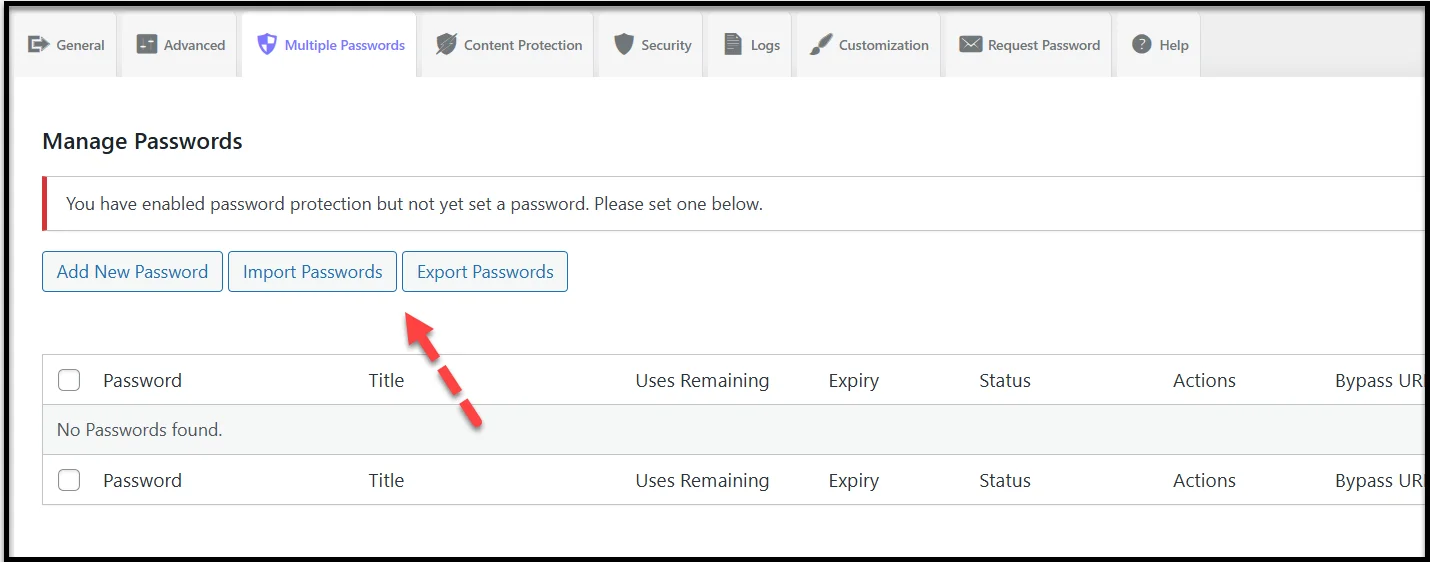
Here’s why this matters:
- If your agency uses a standard set of passwords for internal team members, you can apply them instantly across projects.
- Onboarding a new freelancer or developer? Add their password once and carry it over to other staging sites with a few clicks.
- If a project wraps up and you need to reset client access, exporting and editing the password list is faster than starting from zero.
For agencies handling multiple clients, this feature is a massive time-saver. What used to take 15–20 minutes per site now takes just seconds, leaving more room to focus on the actual work that matters.
Bonus: Extra Powerful Features Agencies Love
Beyond the core features, Password Protected includes several smaller but powerful tools that agencies often rely on to save more time. These extras may not always get the spotlight, but they can make day-to-day workflows noticeably smoother.
- Custom Login Text: Add your agency’s branding or quick instructions to the password form. This avoids confusion and gives clients a more polished experience when accessing a staging site.
- Captcha Protection: With built-in integrations for Google reCAPTCHA, hCaptcha, and Cloudflare Turnstile, agencies can block unwanted bots from hammering login pages. Less spam means fewer interruptions.
- Limit Login Attempts – Protects your staging and client sites from brute-force attacks by blocking repeated failed login attempts. This reduces security risks and cuts down the time spent dealing with unnecessary site alerts.
- Automatic Cookie-Based Login: After logging in with your password, you remain logged in for a set period. This saves your team from typing the password over and over while working on the site.
These extras may feel small, but together they add up to serious time savings, especially when your agency is managing multiple projects at once. They also give a more professional impression to clients, showing that you take both security and usability seriously.
Why Password Protected Pro is a Game-Changer for Agencies
For small WordPress agencies, time is the most valuable resource. Every hour spent setting up site access, resetting passwords, or explaining login details is an hour that could be used building better websites and serving clients.
The Password Protected plugin helps cut out that wasted time. From instantly locking down staging sites to simplifying client previews, managing multiple passwords, controlling access by user roles, and reusing password setups across projects, it delivers practical solutions that fit directly into an agency’s workflow.
And when you add the advanced features of Password Protected Pro, like bypass links, import/export, and user role restrictions, the savings become even more significant. Your agency works faster, clients get a smoother experience, and projects stay secure without extra overhead.If you’re ready to stop wasting time on repetitive access management tasks, give Password Protected Pro a try. It’s a simple upgrade that pays off quickly for agencies managing multiple WordPress sites.