



Customizing a password-protected screen has always been harder than it should be. Want to add your logo? Change the background color? Match your brand’s typography?
And for site owners who did know some CSS, it meant making a change, saving it, reloading the page to check, and repeating the process until it looked right.
That’s why we’re excited to announce the Real-Time Customizer in Password Protected Premium v2.2.0. With instant live previews built right into the WordPress Customizer, you can finally design a password screen that looks the way you want.
Let’s take a look at what this release has to offer.
Introducing the Real-Time Customizer
The Real-Time Customizer lets you design your password screen visually, right inside the familiar WordPress Customizer, with no coding required. As you make changes, you see them applied instantly, so you know exactly what your visitors will see before you publish anything.
👉 You can access it from Password Protected → Customize or directly through Appearance → Customize.
Whatever you adjust, namely:
- Logo — upload your own branding instead of the default screen
- Colors — match your password screen to your site’s color palette
- Typography — control fonts and text styling
- Backgrounds — set custom background images or colors
- Password-Protected Content Styling — customize the appearance of the password-protected screen
- Custom CSS — add your own CSS for advanced styling and complete control
Every adjustment is reflected instantly in the preview pane, so you can see how your changes look without saving and reloading the page. When you’re happy with the result, simply save your changes to apply them.
Here’s how it works:
- You open Password Protected → Customize.
- You select what you want to change – your logo, colors, typography, or background.
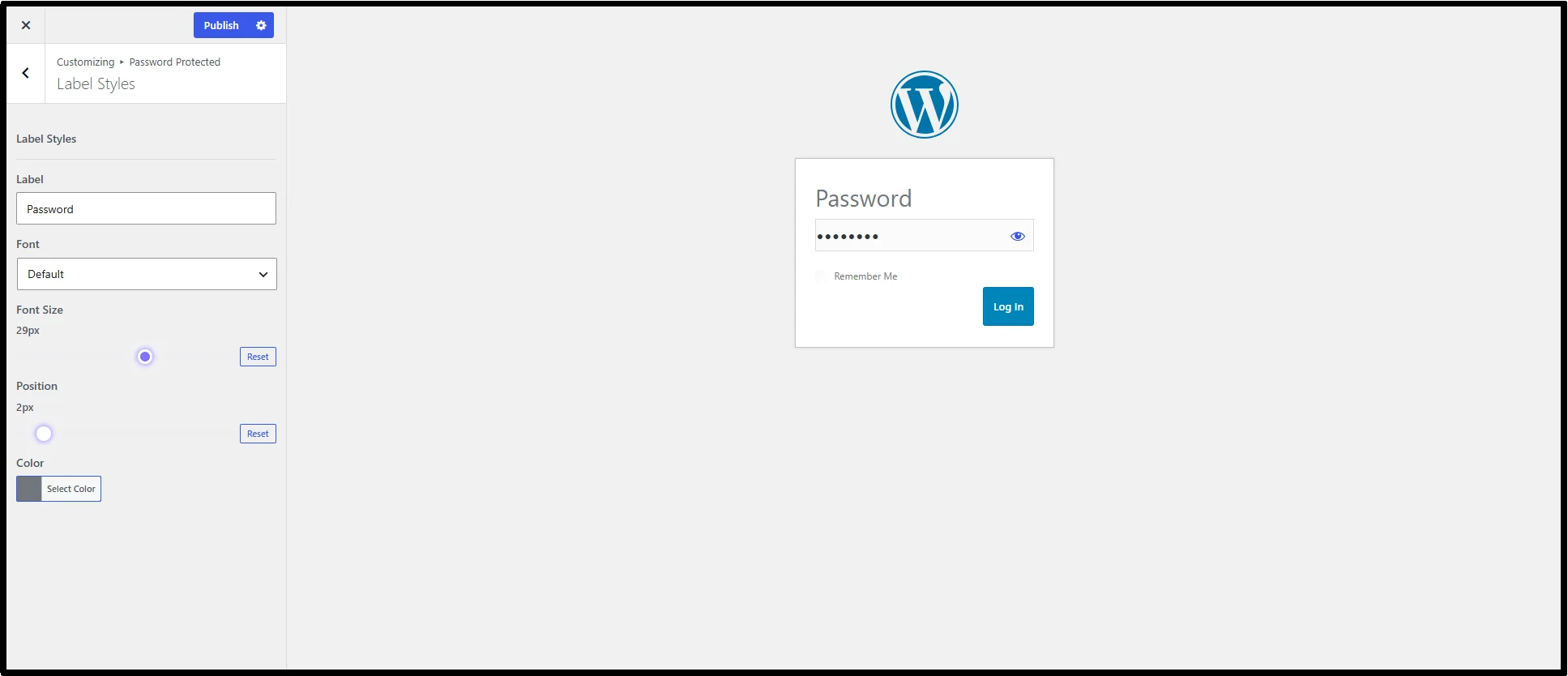
- The preview pane updates instantly, showing exactly how the screen will look.
- You click Publish, and your new design goes live.
This works well for:
- Membership sites
- Client preview sites
- Agency and freelancer projects
- Branded customer portals
- General WordPress websites
What’s Included in This Release?
This release adds the Real-Time Customizer to Password Protected Premium. Here’s a quick breakdown of what’s new in each version:
Free (v2.8.2)
- Maintenance update with minor improvements and fixes.
Pro (v2.2.0)
- Real-Time Customizer
Why You’ll Love It
The Real-Time Customizer allows you to:
- Create a branded password protected experience that feels like a core part of your site.
- Match the protected screen with the rest of your website, so the experience feels consistent from the moment visitors land on it.
- Save time with live previews instead of the old trial-and-error of editing CSS, saving, and reloading to check the result.
- Make design changes confidently, even if you have no technical or coding background.
- Deliver a more professional first impression to clients, members, or visitors seeing your protected content for the first time.
Start Customizing Your Password Screen Today
If you’re already using Password Protected Premium, updating to v2.2.0 is simple:
Go to your WordPress Dashboard → Plugins → Installed Plugins → Password Protected Premium → Update Now.
If you’re still using the free version, this is a great time to upgrade. Going Pro unlocks the Real-Time Customizer, along with other premium features such as:
- Multiple Passwords
- Request Password
- Bypass Links
- Content Protection
- Import/Export Passwords
- …and more
👉 Install the free version first, then click the Get Pro tab inside your dashboard to upgrade.
We’d Love Your Feedback
We’d love for you to try out the Real-Time Customizer and let us know what you think. Does it make customizing your password screen easier? Is there anything you’d like to see added in future updates?
Thanks, as always, for choosing Password Protected Premium to protect your WordPress content.